3CX Partner in Saudi Arabia: Business Phone System Solutions
As a 3CX partner in Saudi Arabia, we deliver every 3CX service: licensing and renewals, cloud or on-premise PBX setup, trunks and IP phones, WhatsApp, SMS, live chat and email connectivity, and Odoo and CRM integration, plus training and technical support. Use 3CX on its own or alongside our tracking and Odoo solutions.

What Is 3CX?
3CX is a business communications and phone-system platform that can support organizational calling and call handling, depending on the selected edition, configuration and deployment. A business phone system can help with:
Organizing calls
Organizing incoming and outgoing calls.
Internal extensions
Managing internal extensions between users.
Directing calls
Directing calls to suitable teams.
Offices and teams
Supporting communication across offices and teams.
Consistent experience
Providing a consistent call-handling experience.
Please note: 3CX is a communications solution, separate from GPS tracking and Odoo ERP, and not a hardware-only product. Not every subscription or deployment includes every feature.
Every 3CX Service From a 3CX Partner in Saudi Arabia
From licensing to go-live and support, we set up your company’s complete phone system.
Licensing and renewals
Choose the right 3CX edition and licenses for your users and calls, renewed on time.
Cloud or on-premise PBX
Deploy 3CX in the cloud or on a server at your premises.
Trunks and phones
Connect SIP trunks from your telecom provider and configure IP phones, mobile and desktop apps.
Call routing and IVR
Set up extensions, IVR menus, ring groups and call queues.
Odoo and CRM integration
Show customer details on calls and log calls in Odoo or a compatible CRM.
Migration from a legacy PBX
Move from a traditional PBX to 3CX with numbers and routing planned in advance.
Training
Train staff and supervisors on the apps and the management console.
Support and maintenance
Post-go-live support, updates, backups and call-quality follow-up.
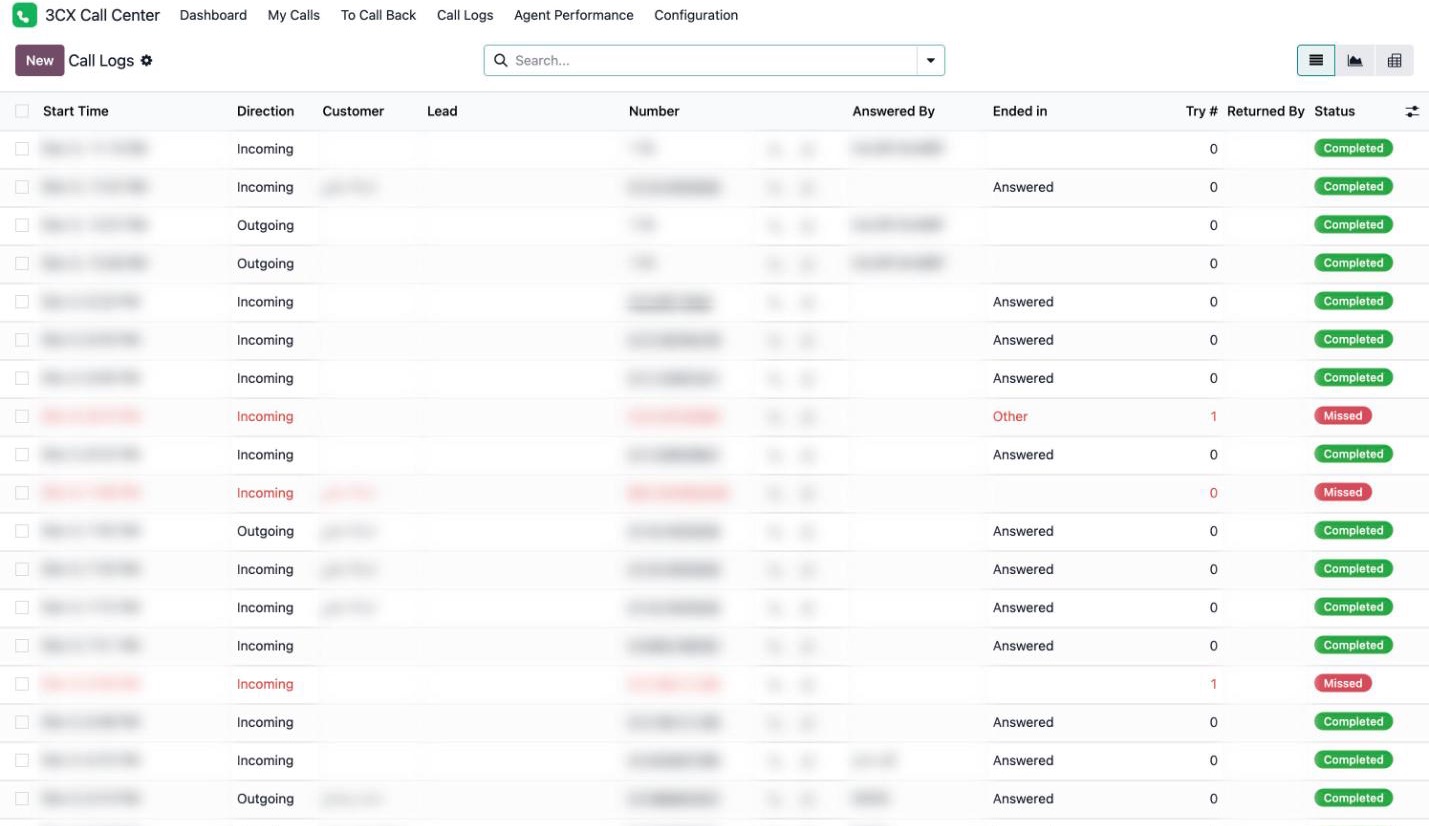
3CX inside Odoo: a call center tied to all your customer data
Agents know who is calling before they answer, every call is saved on the customer record, and managers see team performance in one place.
Click-to-call
From the customer record in Odoo: the agent extension rings first, then the system calls the customer. Each Odoo user is mapped to their 3CX extension.
Caller popup
An incoming call opens a live popup with the customer name, plus the vehicle, driver and status from the tracking platform, so the agent does not have to ask which vehicle they mean.
Log on the customer record
Direction, time, who answered, outcome, customer and opportunity, saved on the customer history with everything else that happened.
Missed call follow-up
A call-back list by team, who the phone rang for, who returned the call and how many attempts, plus a daily report to the manager of who is still waiting.
Softphone in the browser
Odoo itself becomes the agent phone: dialpad, answer, hold and transfer, with the customer number hidden from the agent. 3CX stays the PBX for recording and trunks.
Call center dashboard
Total and missed calls, calls per employee and average duration, in graphs and tables, with separate rights for users, managers and administrators.
These screenshots come from a real operating system in daily use, with customer, staff and phone details hidden for privacy. The apps and integrations enabled for each client are set by the project scope and subscription.
Cloud PBX and call center: every 3CX service in one system
As a 3CX partner working on version 20, we set up what your team needs according to the chosen license.
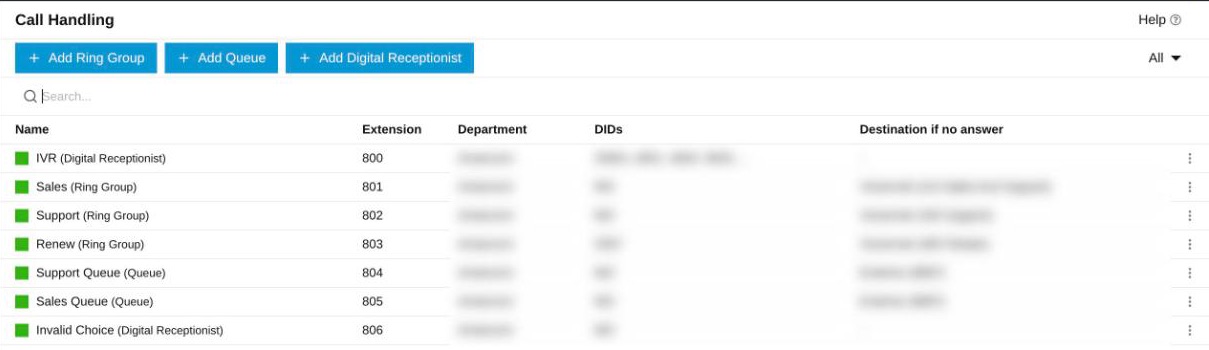
Call routing
Digital receptionist (IVR), ring groups, queues, departments, office hours and a fallback destination when nobody answers.
Live conversations
Website chat, WhatsApp and SMS on one screen with your calls, distributed across the team.
Meetings and teams
Video meetings, a contact directory, voicemail, and apps for mobile, desktop and browser.
Reports and monitoring
Call reports, a live panel for calls and queues, an event log, and call recording with rights set per employee.
Artificial intelligence
Call transcription and the AI capabilities of the 3CX AI edition, plus a voice assistant that answers customers about their vehicles from the tracking platform.
Integrations and protection
CRM, Odoo, Google, Microsoft 365, Teams and an API, with automatic backups, automatic updates and an audit log.
WhatsApp, SMS, Live Chat and Email With 3CX
Bring calls and customer conversations into one interface for your service and sales teams.
WhatsApp Business
Receive and answer WhatsApp Business chats in the 3CX app and route them to your service team.
SMS
Send and receive text messages in 3CX through an SMS-capable trunk provider.
Website live chat
A chat and call button on your website that reaches your team in 3CX directly.
Voicemail, faxes and call reports delivered to email automatically.
3CX on Its Own, With Odoo or With Tracking
Use 3CX by itself or make it part of your business system.
3CX only
A standalone business phone system with no other solution required.
3CX with Odoo
Calls linked to customer, sales and support records inside Odoo.
3CX with tracking
Coordinate calls with drivers and field teams alongside fleet tracking in one system.
Capabilities for Better Business Communications
Options available subject to the chosen 3CX version, licensing, configuration and technical requirements.
Business Phone System
A configured phone system can help an organization manage calls and internal communication.
Internal Extensions
Extensions for communication between authorized users or departments, where supported by the selected setup.
Call Routing
Incoming calls directed according to configured rules and the available system features.
Ring Groups
Calls routed to designated groups of users where supported and configured.
IVR and Call Menus
An interactive voice menu may guide callers to the appropriate department when the selected deployment supports it.
Call Queues
Incoming calls organized for a team, subject to supported functionality and configuration.
Voicemail
Available voicemail functions where included and configured.
Remote and Distributed Teams
Supported options for users across different locations, offices or approved remote environments.
Please note: not all features are activated by default or available under every license.
A More Organized Calling Experience for Your Customers
A properly configured business phone system can help businesses manage incoming calls more systematically, for example by:
- Directing callers to an appropriate department.
- Organizing call flows during business hours.
- Providing configured options for callers.
- Routing calls to designated teams.
- Managing missed calls according to available system features and agreed procedures.
Please note: customer experience depends on the organization’s call-flow design, staffing, configuration, network quality and operating procedures.
Illustrative call flow
The actual flow depends on your design and the features configured.
Communication Solutions for Different Teams
Possible configurations for each team’s needs; specific call-center features or integrations must be checked against the selected offering and implementation.
Customer service
Distribute incoming calls across the team in an organized way.
Sales teams
Route prospective-customer enquiries to the right sales team.
Technical support
Direct support requests to the responsible team.
Reception and administration
Answer calls and transfer them internally to staff or departments.
Offices and branches
Internal communication between branches with suitable setup and connectivity.
Small and medium-sized businesses
An organized phone system suited to the team’s size and needs.
Larger multi-team organizations
Call flows for several teams, where the selected deployment supports the requirements.
Planning the Right Communications Infrastructure
The appropriate deployment depends on the customer’s operational and technical requirements, including:
Hosting and deployment
Hosting and deployment preferences.
Users and call activity
Number of users and expected call activity.
Offices and branches
Number of offices or branches.
Internet and network
Available internet and network infrastructure.
Devices and apps
Compatible phones, headsets and client applications.
External connectivity
External telephone connectivity and SIP trunk requirements where applicable.
Security and administration
Security, access and administration requirements.
Please note: the recommended architecture must be assessed against the actual 3CX offering, network environment and client requirements; capacity limits, hardware requirements and license restrictions are only stated once verified.
Integrations That Support Business Workflows
Certain integrations may be available depending on 3CX functionality, supported connectors, selected software, licensing and configuration. Areas to evaluate include:
CRM systems
CRM systems and customer records.
Business applications
Other business applications.
Call workflows
Contact and call-handling workflows.
Existing infrastructure
Existing office communication infrastructure.
Other applications
Other supported applications the client requires.
Please note: a general integration possibility is different from an integration that has been implemented and verified, and any integration must be confirmed before implementation. Odoo ERP and 3CX each work on their own, and can be connected as the “3CX inside Odoo” section on this page shows.
From Requirements Assessment to Communications Setup
A realistic process to support your 3CX project.
Requirements Assessment
Understand the organization’s users, departments, calling patterns and infrastructure.
Solution Planning
Identify a suitable approach based on the requirements and verified 3CX capabilities.
Configuration and Setup
Plan the phone system, users, extensions and supported call flows according to the agreed scope.
Connectivity and Functional Checks
Verify the configured call flows and connectivity included in the project.
Handover and Support
Provide relevant handover and technical support according to the agreed services.
Delivery timelines, migration outcomes, training hours, response times and service levels are defined only in the actual contract.
Practical Value for Your Business
Realistic benefits that depend on configuration and procedures; 3CX does not automatically solve staffing or customer-service problems.
Structured call handling
More structured call handling.
Clearer communication flows
Clearer communication flows between departments.
Workflow visibility
Improved visibility into configured communications workflows.
Distributed teams
Support for teams working across locations, where supported.
A consistent approach
A more consistent approach to managing business calls.
Configured to your needs
A system configuration based on the organization’s needs.
Why Choose Afaq for 3CX Solutions?
Afaq Smart Tracking is a distributor of 3CX solutions, provided according to the agreed commercial and technical scope.
Requirements assessment
Help assessing business communication requirements.
3CX solutions
Providing 3CX solutions according to the agreed commercial and technical scope.
Call-flow planning
Help planning users, extensions and call flows.
Infrastructure and integrations
Considering existing infrastructure and supported integration requirements.
Technical support
Technical support according to the agreed service scope.
Frequently Asked Questions
Short answers to common questions about 3CX solutions.
What is 3CX?
3CX is a business communications and phone-system platform that helps organize calls, internal extensions and call routing, depending on the edition, configuration and deployment.
Is 3CX suitable for small and medium-sized businesses?
It can be; suitability depends on business requirements and the selected deployment.
Can internal extensions be configured?
Yes, internal extensions can be configured according to the selected version and configuration.
Can incoming calls be routed to different departments?
Yes, using routing rules, ring groups, IVR menus or queues, where supported by the version and license and configured appropriately.
Can the system support multiple offices?
Yes, with appropriate technical setup and connectivity between locations.
Does 3CX support remote workers?
Remote users can be supported depending on the version and configuration, with appropriate technical setup and connectivity.
Can 3CX integrate with other business applications?
Integrations may be available depending on supported connectors, software and licensing; any integration must be verified before implementation.
Can we identify the right solution before purchasing licenses?
Yes. We recommend assessing requirements and confirming the deployment and commercial scope before implementation and license purchase.
Does Afaq Smart Tracking provide 3CX solutions and implementation services?
Yes. Afaq provides 3CX solutions as a distributor, along with planning, setup and support services according to the scope agreed for each project.
Is Afaq Alrasd Aldhki a 3CX partner in Saudi Arabia?
Yes. Afaq Alrasd Aldhki is a 3CX partner in Saudi Arabia, providing licensing, setup, trunks, integration, training and support.
Can WhatsApp and SMS be connected to 3CX?
Yes. 3CX can handle WhatsApp Business chats, SMS and live chat in one interface; we configure it according to your edition and trunk provider.
Do you offer a cloud PBX for businesses?
Yes. 3CX can run as a cloud PBX or on a server at your premises, and we help you choose the right option.
How much does a 3CX phone system cost?
Cost depends on the edition, simultaneous calls, hosting, phones and implementation scope. Request a quote and we will outline the options. For details, read our guide to 3CX pricing in Saudi Arabia.
Plan the Right Business Phone System for Your Organization
Discuss your organization’s communication requirements with Afaq Smart Tracking to identify suitable 3CX capabilities, implementation needs, and call-handling options.